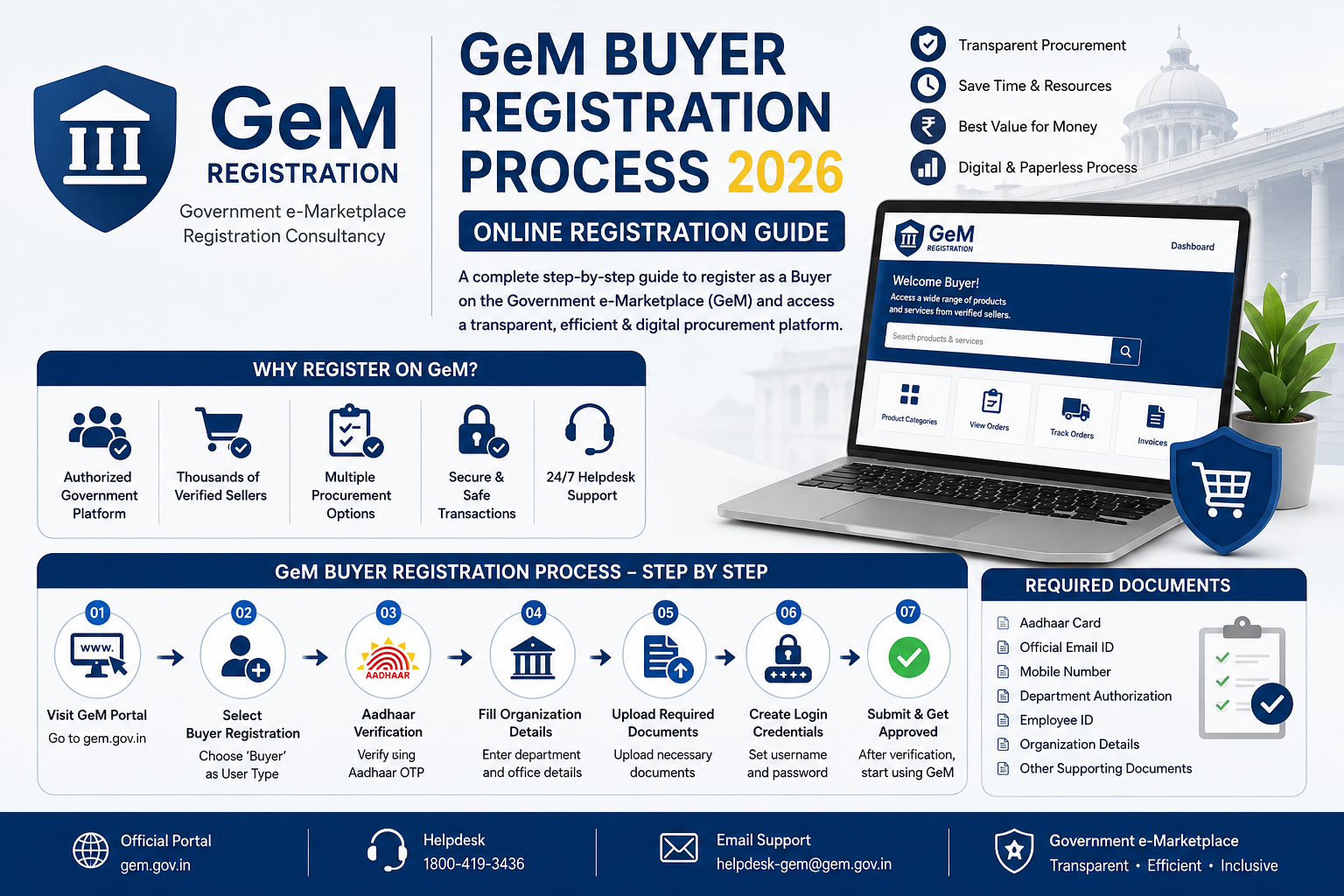
The GeM buyer registration process enables central and state government departments, PSUs, and autonomous bodies to procure goods and services transparently. This updated guide details the official step-by-step procedure for setting up your procurement account on the Government e-Marketplace (GeM).
From verifying official credentials to managing primary and secondary buyer roles, learn how to complete your online buyer registration without delays.
What is Government e-Marketplace Buyer Registration?
Government e-Marketplace buyer registration is the official onboarding process that enables authorized officials from public sector departments, ministries, public sector undertakings (PSUs), state entities, and defense establishments to procure goods and services online. Through the official GeM portal, government entities establish verified institutional accounts to publish tenders, execute direct orders, and run competitive bids transparently.
The Legal Framework: Mandate Under GFR Rule 149
The core legal foundation for buyer account creation on GeM is governed by Rule 149 of the General Financial Rules (GFR), 2017, issued by the Department of Expenditure, Ministry of Finance. GFR Rule 149 renders procurement on GeM mandatory for all Central Government Ministries, Departments, and attached units for goods and services available on the portal. The rule establishes strict procurement thresholds:
- Up to ₹25,000: Direct purchase permitted from any suitable GeM vendor offering the required specifications, quality, and delivery timelines.
- Above ₹25,000 up to ₹5,00,000: Direct purchase allowed through the lowest priced (L1) vendor among at least 3 distinct sellers matching required specifications.
- Above ₹5,00,000: Mandatory online competitive bidding or Reverse Auction (RA) conducted exclusively through the portal.
Structure of Government Buyer Accounts
To enforce administrative accountability and legal compliance, the GeM buyer registration process mandates a structured organizational hierarchy during account setup:
- Primary User: Served by the Head of Department (HoD) or Head of Office (HoO). The Primary User verifies organization credentials, defines organizational sub-units, and assigns operational roles.
- Secondary Users: Subordinate officers appointed by the Primary User to perform specific functions, including Buyer (responsible for creating tenders and purchase orders), Consignee (responsible for inspecting goods and issuing Provisional Receipt Certificates), and Paying Authority (PAO/DDO) (responsible for releasing funds within the statutory 10-day period post-CRAC generation).
Understanding this legal architecture helps sellers, contractors, and MSMEs anticipate government purchasing patterns. If you need step-by-step guidance on setting up portal credentials, read our Seller & Buyer GeM Registration – Step-by-Step GeM Portal Login & Registration Guide.
What is the GeM Buyer Portal?
The GeM buyer portal is a dedicated end-to-end e-procurement infrastructure hosted on the official Government e-Marketplace portal. Spearheaded by the Ministry of Commerce and Industry, it enables Central and State Government ministries, Public Sector Undertakings (PSUs), autonomous bodies, defense forces, and local municipal authorities to fulfill their commercial needs directly from verified sellers and registered MSMEs.
Designed to replace legacy manual tendering processes, the portal creates a paperless, contactless, and cashless ecosystem for public procurement. Officials access a modern, dashboard-driven interface designed to streamline high-volume, compliant purchases through direct buying, L1 price comparison, custom bidding, and Reverse Auctions (RA).
Key Features, Security Protocols, and Infrastructure
- NIC and Official Email Integration: To initiate Government e-Marketplace buyer registration, public officials must use an authorized domain email address (such as
@nic.in or @gov.in). Personal email domains are strictly barred to maintain organizational accountability.
- Aadhaar-Based Security Protocols: The official GeM buyer login process mandates multi-factor authentication (MFA) via Aadhaar-linked mobile OTPs, ensuring cryptographic data security and non-repudiation of transactions.
- Role-Based System Access: The portal maintains strict division of power through two distinct administrative tiers—Primary Users (Heads of Department who configure organizational structures) and Secondary Users (Buyers, Consignees, and Paying Authorities/PAOs responsible for order generation and bill clearance).
- Integrated Payment Ecosystem: The portal interfaces seamlessly with the Public Financial Management System (PFMS), State Treasury gateways, and PSU banking networks. This integration automatically tracks funds and enforces timely vendor payments within 10 days of issuing the Consignee Receipt and Acceptance Certificate (CRAC).
For official department registration steps and system login procedures, refer to our comprehensive Seller & Buyer GeM Registration – Step-by-Step GeM Portal Login & Registration Guide. By centralizing government demand, the GeM portal delivers standard pricing across India and guarantees equal access for registered vendors.
Who Can Register as a GeM Buyer?
The Government e-Marketplace is designed exclusively for public sector procurement under Rule 149 of the General Financial Rules (GFR), 2017. Private commercial enterprises, individual buyers, and consumer accounts are not eligible for buyer access. To register on the official GeM portal as a buyer, an entity must be authorized by the Central or State Government to spend public funds for procurement.
The following categories of organizations are eligible to complete the Government e-Marketplace buyer registration:
- Central & State Government Ministries: All executive departments, attached offices, and subordinate offices operating under Central or State administrations.
- Public Sector Undertakings (PSUs): Central Public Sector Enterprises (CPSEs) and State PSUs, including commercial undertakings like ONGC, NTPC, and BHEL.
- Constitutional & Statutory Bodies: Independent authorities established by the Constitution or Acts of Parliament, such as the Election Commission of India, UPSC, Comptroller and Auditor General (CAG), and NITI Aayog.
- Panchayati Raj Institutions (PRIs) & Urban Local Bodies: Gram Panchayats, Panchayat Samitis, Zilla Parishads, Municipalities, and Municipal Corporations authorized to execute local public works and procurements.
- Autonomous Institutes & Academic Bodies: Publicly funded educational institutions (IITs, NITs, Central Universities), medical colleges (AIIMS), and national research laboratories (CSIR, DRDO, ICMR).
- Defense & Paramilitary Forces: Units under the Ministry of Defence, Indian Armed Forces, Central Armed Police Forces (CAPF), and Ordnance Factories.
Mandatory Authorization Requirements for Buyer Onboarding
Before initiating the GeM buyer registration process, the initiating officer must meet specific administrative criteria to verify official authority:
- Primary User Designation: The registration must be initiated by an officer of the rank of Deputy Secretary, Head of Office (HoO), or Drawing and Disbursing Officer (DDO).
- Official Email Domain: Registration requires an official email address ending in
@gov.in or @nic.in. PSU officers must use their official corporate email domains recognized by the GeM system.
- Aadhaar Verification: The designated Primary User must possess an active Aadhaar number linked to their current mobile number for e-KYC and digital signing.
- Nodal Officer Authorization: An official sanction letter or office order assigning procurement responsibilities under GFR guidelines.
If you are a vendor seeking to supply goods or services to these verified public buyers, refer to our complete Seller & Buyer GeM Registration – Step-by-Step GeM Portal Login & Registration Guide to set up your profile and participate in government tenders efficiently.
GeM Buyer Registration Documents
Before initiating the GeM buyer registration process, government departments, Public Sector Undertakings (PSUs), constitutional bodies, and local urban authorities must assemble a mandatory set of official credentials. Unlike seller onboarding, Government e-Marketplace buyer registration enforces strict administrative verification to maintain auditability and financial security during public GeM procurement.
To register successfully on the GeM buyer portal, the designated Primary User (typically an officer of Under Secretary rank or equivalent Head of Office) must have the following credentials verified and ready:
- Aadhaar Card Linked with Active Mobile Number: The Aadhaar or Virtual ID (VID) of the Primary User is required for e-KYC. The mobile number registered with Unique Identification Authority of India (UIDAI) must be active to receive Real-Time OTPs during key approval steps.
- Official Government Email ID: The Primary User must use an active government domain email address ending in
@gov.in or @nic.in. State government email domains (such as @karnataka.gov.in or @rajasthan.gov.in) are also accepted. Standard commercial email services (Gmail, Outlook, Yahoo) cannot be used on the portal.
- Head of Department (HOD) Authorization Letter: A formal authority letter signed and stamped by the competent Head of Department or Head of Office. This document explicitly authorizes the designated official to act as the Primary User, create Secondary User roles (Buyers, Consignees, PAOs), and commit government procurement funds.
- DDO and Payment Authority Credentials: Financial mapping information including Drawing and Disbursing Officer (DDO) Code, Pay and Accounts Office (PAO) details, and integration parameters for payment processing engines such as PFMS, CGDA, or State IFMS.
- Organizational Identity Proof: Official postal address proof, designation details, employee code, and official contact numbers.
Compiling these essential GeM buyer registration documents beforehand eliminates account creation errors and ensures seamless verification. For step-by-step instructions on setting up your administrative profile, read our complete guide on Seller & Buyer GeM Registration – Step-by-Step GeM Portal Login & Registration Guide. You can also verify official buyer onboarding prerequisites directly on the GeM portal.
Understanding Primary User vs Secondary User Roles
To execute smooth procurement on the Government e-Marketplace, government departments, local bodies, and public sector undertakings (PSUs) operate under a structured administrative hierarchy. Understanding the operational distinction between Primary Users and Secondary Users is a crucial component of the GeM buyer registration process, ensuring that financial authorization remains strictly separated from daily purchasing activities.
Primary User: Account Creator and Governance Head
The Primary User role is held by a Head of Department (HOD), Drawing and Disbursing Officer (DDO), or an authorized executive officer of a Central/State Ministry or autonomous body. During the initial onboarding outlined in our Seller & Buyer GeM Registration – Step-by-Step GeM Portal Login & Registration Guide, the Primary User verifies the organization’s administrative identity using Aadhaar-based e-KYC and an official government email address (such as @gov.in or @nic.in).
- Key Responsibilities: Creating organizational sub-offices, managing departmental structure, verifying user identity credentials, and assigning operational roles to Secondary Users.
- Operational Limitations: Primary Users administer master access on the official GeM portal, but they do not directly select vendor products, float bids, or generate purchase contracts.
Secondary Users: Execution and Transaction Roles
Once the master administrative account is configured, the Primary User creates Secondary User profiles to handle day-to-day GeM procurement tasks. Secondary Users log in with individual credentials under three specific functional designations:
- Buyer: Conducts market research, creates product/service cart selections, publishes L-1 Bids and Reverse Auctions (RA), evaluates technical proposals, and issues final purchase contracts.
- Consignee: Designated to receive and inspect physical shipments or service deliverables at the delivery location. The Consignee issues the Provisional Receipt Certificate (PRC) and must generate the final Consignee Receipt and Acceptance Certificate (CRAC) within 10 days of delivery.
- Paying Authority (PAO/DDO): Manages financial disbursement. Upon generation of the CRAC, the PAO processes vendor invoices and facilitates payment direct to the seller’s bank account within 10 days.
This clear segregation within the GeM buyer login architecture eliminates conflict of interest, maintains audit trails, and protects public funds across all government transactions.
How to Register as GeM Buyer
Completing the GeM buyer registration process requires specific authority authorization, as buyer accounts on the Government e-Marketplace buyer registration system hold the power to allocate public funds for public procurement. The Primary User—typically an officer of the rank of Deputy Secretary, Head of Office, or equivalent authorized officer—must initiate the registration workflow on the GeM buyer portal.
Follow this step-by-step guide to complete your GeM buyer registration online:
Step 1: Aadhaar OTP Validation
Access the portal's registration section and select the "Buyer / Primary User" option. Input your 12-digit Aadhaar number (or Virtual ID) and the mobile number registered with UIDAI. Click on "Verify Aadhaar" to trigger a time-sensitive One-Time Password (OTP) on your mobile handset. Successfully entering this OTP validates your personal identity as an authorized government official.
Step 2: Official Email Verification
Enter your official organizational email address. The system mandates standard official email domains, such as @gov.in or @nic.in, though verified domain extensions assigned to specific state departments, public sector undertakings (PSUs), and autonomous bodies are also supported. Retrieve the verification code sent to this inbox to verify your official credentials.
Step 3: Organization Detail Input
Select your organizational tier from the dropdown system, specifying your Ministry, Department, Organization, and exact Office Name. At this stage, you must also input essential financial and accounting details, including your Primary Accounting Office (PAO), Drawing and Disbursing Officer (DDO), or Controller of Accounts details, along with the office GSTIN or TAN to enable automated bill processing.
Step 4: User ID Creation & HOD Approval
Establish a unique User ID and secure password for future GeM buyer login access. After submitting the form, an official authorization request is routed for Head of Department (HOD) approval. Depending on your organization's setup, the HOD verifies the application via e-Sign, digital signature certificate (DSC), or official email link approval. Once approved, your account is activated to create procurement bids, direct purchases, or add secondary users.
To learn more about managing both purchasing profiles and vendor accounts, refer to our comprehensive Seller & Buyer GeM Registration – Step-by-Step GeM Portal Login & Registration Guide or access the primary portal directly at gem.gov.in.
GeM Buyer Registration Online Benefits
Completing your GeM buyer registration online grants government departments, Central Public Sector Enterprises (CPSEs), autonomous bodies, and local entities direct access to a transparent, efficient, and fully digital public procurement ecosystem. By transitioning procurement workflows to the official GeM portal, verified buying officers unlock flexible, speed-driven purchasing modes governed strictly under General Financial Rules (GFR Rule 149).
Key Financial & Procurement Advantages for Buyers
Understanding these structured procurement mechanisms enables primary and secondary buyers to optimize departmental budgets while maintaining 100% audit compliance:
- Direct Purchase Option (Up to ₹25,000): For urgent, low-value operating requirements, buying officers can execute a direct purchase up to ₹25,000 without generating tenders or mandatory price comparisons. The transaction can be finalized immediately with any registered supplier meeting the basic product specifications.
- L1 Price Comparison (Above ₹25,000 to ₹5,00,000): For mid-range GeM procurement, the system provides automated comparison tools across at least three distinct manufacturers or authorized resellers. The portal automatically identifies and mandates selection of the lowest eligible (L1) seller meeting required quality standards.
- Reverse Auction (RA) Capabilities: For high-value transactions exceeding ₹5,00,000, buyers can publish electronic bids or trigger a Reverse Auction (RA). Dynamic RA features foster real-time competitive bidding, where participating vendors bid downward, driving substantial cost savings for the exchequer.
- Automated Financial Concurrence: The Government e-Marketplace buyer registration system seamlessly integrates buyer accounts with national financial channels like PFMS (Public Financial Management System), PAO, and state IFMS modules. This automated link enables instant online budget validation, digital sanction generation, and automated payment disbursements within 10 days of Consignee Receipt and Acceptance Certificate (CRAC) generation.
Initiating the GeM buyer registration process equips procurement heads with end-to-end audit trails, eliminating physical paperwork, administrative bottlenecks, and vendor bias. To learn more about managing both buyer administrative accounts and seller profiles, refer to our Seller & Buyer GeM Registration – Step-by-Step GeM Portal Login & Registration Guide.
GeM Buyer Login Process
Once your buyer account is created, accessing the Government e-Marketplace user dashboard requires adhering to multi-factor security protocols. Central government departments, state bodies, PSUs, and authorized procuring officers must navigate the secure portal to create carts, initiate direct purchases, generate L1 bids, or publish reverse auctions. For detailed onboarding instructions prior to signing in, review our Seller & Buyer GeM Registration – Step-by-Step GeM Portal Login & Registration Guide.
Step-by-Step Guide to Accessing Your GeM Buyer Dashboard
Follow these official steps to complete your GeM buyer login and gain full access to procurement functionalities:
- Navigate to the Official Portal: Visit the official portal homepage at gem.gov.in and click on the Login button located at the top right corner of the header.
- Enter User ID and Security Captcha: Input your registered User ID (typically created during primary or secondary buyer account setup) and complete the visual Captcha verification to proceed.
- Provide Account Password: Enter your confidential account password. If you have forgotten your password, use the official reset option, which routes a link to your official government email address (e.g., @nic.in, @gov.in, or domain-verified official email).
- Complete Two-Factor Authentication (2FA): The GeM buyer portal enforces mandatory 2FA security. Upon entering valid credentials, a 6-digit One-Time Password (OTP) is dispatched to your Aadhaar-linked mobile number and registered email address. Enter the OTP within the 180-second validity window to authenticate your session.
Upon successful authentication, primary buyers (Head of Office) and secondary buyers (Buyers, PAO/DDO, Consignees) are redirected to their personalized procurement dashboard. From this dashboard, officials can verify financial approvals, manage sanction orders, monitor delivered goods, and process payments through the integrated Public Financial Management System (PFMS) or state-specific treasury systems.
Features Available After GeM Buyer Login
Once government officers complete their account setup and authenticate their credentials on the GeM buyer portal, they unlock a robust suite of digital procurement tools designed to streamline public spending. Accessing the dashboard via a verified Seller & Buyer GeM Registration – Step-by-Step GeM Portal Login & Registration Guide grants Primary and Secondary Buyers full administrative control over the end-to-end procurement lifecycle—from requisition to vendor settlement.
The post-login environment equips government departments, Central and State PSUs, defense establishments, and autonomous bodies with key functional capabilities:
- Dynamic Pricing and L1 Direct Purchase: Buyers can instantly execute direct purchases for orders up to ₹25,000. For procurements between ₹25,000 and ₹5,00,000, integrated dynamic pricing tools automatically compare at least three distinct OEM products to identify the lowest compliant (L1) price.
- Direct Bidding & Reverse Auction (RA): For high-value transactions exceeding ₹5,00,000, buyers can publish open electronic bids or trigger automated Reverse Auctions directly on the GeM portal. The system enforces real-time competitive price discovery to maximize treasury savings.
- Custom Catalog Generation: If specialized operational needs are not covered by standardized marketplace categories, buyers can build custom item catalogs, upload Bill of Quantities (BOQ) specifications, and draft custom Service Level Agreements (SLAs).
- End-to-End Contract Management: The dashboard centralizes purchase order issuance, delivery timeline monitoring, liquidated damages (LD) calculations, and the digital generation of mandatory Consignee Receipt-cum-Acceptance Certificates (CRAC).
- Integrated Online Payment Gateways (PFMS/e-PAO): To ensure strict adherence to mandatory payment timelines (releasing funds within 10 days of CRAC issuance), the portal seamlessly links with the Public Financial Management System (PFMS), e-Payable Accounts Offices (e-PAO), Treasury systems, and designated nationalized bank gateways.
Leveraging these integrated tools after a successful GeM buyer login eliminates manual administrative bottlenecks, enhances procedural transparency, and guarantees full compliance with Rule 149 of the General Financial Rules (GFR).
Why Choose the GeM Buyer Portal?
Transitioning from traditional manual tendering to modern digital procurement has fundamentally restructured how government departments, PSUs, autonomous bodies, and constitutional authorities source goods and services in India. The official GeM portal replaces cumbersome physical paperwork with an end-to-end paperless, contactless, and cashless ecosystem designed for maximum efficiency.
For primary and secondary buyers in government organizations, completing the Government e-Marketplace buyer registration unlocks significant strategic advantages across key operational metrics:
- Reduced Cycle Time: Legacy paper-based tenders often took anywhere between 90 to 135 days from tender publication to contract award. Under the GeM buyer portal, direct purchases under ₹25,000 occur instantly, while L1 buying (up to ₹5,00,000) and custom e-bidding/Reverse Auctions (RA) settle within 10 to 21 business days on average.
- 100% Audit Trail Compliance: Traditional tenders frequently faced scrutiny over missing physical files, manual bid evaluation discrepancies, or delays in vendor communications. The GeM buyer registration process binds all primary and secondary buyer accounts to Aadhaar-based e-verification, digital signatures, and automated systemic logs. Every bid evaluation, sanction order, and payment processing step is permanently logged in full alignment with CVC guidelines and General Financial Rules (GFR).
- Cost Efficiency & Best Price Discovery: Manual tendering constrained procurement officers to localized supplier networks or expensive public newspaper advertisements. Operating through the portal exposes buyers to millions of verified MSMEs, OEMs, and service providers nationwide, generating average cost savings of 10% to 25% through real-time dynamic pricing and competitive Reverse Auctions.
Understanding these institutional benefits is essential before starting your onboarding process. To get started with account setup, consult our comprehensive Seller & Buyer GeM Registration – Step-by-Step GeM Portal Login & Registration Guide to ensure your organization’s administrative structure aligns seamlessly with the portal’s role hierarchy.
Common Mistakes During GeM Buyer Registration Process
Navigating the Government e-Marketplace buyer registration on the official GeM portal requires strict adherence to administrative guidelines. Even minor discrepancies during account creation can result in verification rejections, operational delays, or account suspensions. Below are the most frequent mistakes government officials and organization representatives make during the registration process:
- Using Personal Email Addresses: Primary Buyers and Head of Department (HOD) profiles must be created using an official domain email address (such as
@gov.in or @nic.in) or an authorized corporate domain of a Public Sector Undertaking (PSU). Registering with personal email domains like Gmail, Yahoo, or Rediffmail leads to automatic rejection during system validation.
- Unlinked or Outdated Aadhaar Mobile Numbers: The mandatory e-KYC authentication step sends a real-time One-Time Password (OTP) to the mobile number registered with UIDAI. If your Aadhaar card is not updated with your active mobile number, you cannot complete identity verification. Ensure your UIDAI contact details are active before initiating registration.
- Incorrect DDO and PAO Code Entry: Accurate financial mapping is essential for seamless payment processing. Entering incorrect Drawing and Disbursing Officer (DDO) or Pay and Accounts Office (PAO) / Controller of Defence Accounts (CDA) codes corrupts your billing hierarchy, leading to contract generation failures and delayed vendor payments later. Verify these codes with your internal finance division before submitting.
- Missing or Invalid HOD Designation Letters: Secondary Buyers must be approved by the Primary Buyer or HOD. Uploading generic office memo copies, unauthorized sanction letters, or documents without a clear official seal and authorized signature will lead to administrative rejection by the GeM portal team.
Avoiding these critical errors ensures smooth buyer onboarding, allowing your organization to quickly execute direct purchases, L1 bids, and reverse auctions. For a complete step-by-step breakdown of buyer setup and portal navigation, explore our Seller & Buyer GeM Registration – Step-by-Step GeM Portal Login & Registration Guide.
GeM Procurement Portal Registration Explained
The Government e-Marketplace buyer registration process is far more than a standard portal signup; it directly connects public entities with India’s core financial and budgetary ecosystem. When a Primary Buyer completes the onboarding steps on the official GeM portal, the platform maps the buyer organization to backend financial infrastructure to enable automated budget validation, transparent accounting, and compliant payment flows.
Core System Integrations in the GeM Buyer Portal
To adhere strictly to General Financial Rules (GFR) Rule 149, the GeM procurement portal integrates with several centralized financial systems during and after buyer onboarding:
- Public Financial Management System (PFMS): Central Government Ministries and Departments link their Drawing and Disbursing Officer (DDO) and Pay and Accounts Office (PAO) codes with PFMS. This ensures real-time fund checking, pre-budget allocation, and direct online payment processing to seller accounts upon consignment approval.
- State Treasuries & IFMS Integration: State departments, public sector undertakings, and Panchayati Raj Institutions map their respective Integrated Financial Management Systems (IFMS) or State Treasury networks (such as e-Kuber). This validation mechanism prevents orders from being placed without prior budgetary approval from the competent authority.
- Central Public Procurement Portal (CPPP) Sync: Procurement data automatically syncs across portals to avoid tender duplication, track annual procurement targets (including MSME and Women Entrepreneur quotas), and maintain complete audit trails.
For a complete structural breakdown of buyer hierarchy and role assignments, read our Seller & Buyer GeM Registration – Step-by-Step GeM Portal Login & Registration Guide. Understanding these underlying financial mappings helps government buyers streamline Sanction Order generation, avoid administrative delays, and maintain 100% compliance during annual financial audits.
Products Available on the GeM Portal
The Government e-Marketplace (GeM) has evolved into a comprehensive digital ecosystem offering over 10,000 product categories and more than 300 service streams. Once public officers complete the Government e-Marketplace buyer registration, they gain direct access to an expansive catalog designed to fulfill every administrative, operational, and specialized procurement need without traditional manual tendering delays.
Key Product Categories for Government Buyers
GeM hosts standardized and custom product catalogs across major industrial and commercial verticals, including:
- IT Hardware & Electronics: Laptops, desktop computers, heavy-duty enterprise servers, interactive flat panel displays, multi-function printers, scanner units, and networking hardware.
- Automotive & Mobility: Electric vehicles (EVs), staff transport buses, ambulances, defense transport, commercial haulage trucks, and utility two-wheelers.
- Medical & Healthcare Equipment: Diagnostic machinery, surgical instruments, ICU hospital beds, oxygen concentrators, and essential pharmaceutical supplies.
- Office Infrastructure & Furniture: Ergonomic workstation desks, executive chairs, modular storage systems, stationery, and energy-efficient LED lighting.
Specialized Service Categories
In addition to physical goods, service procurement forms a major portion of annual transaction volume on the GeM buyer portal. Primary service streams available for direct hiring or bidding include:
- Manpower Outsourcing: On-demand deployment of data entry operators, security personnel, sanitation staff, healthcare workers, and specialized technical experts.
- Cloud Computing & IT Services: Empaneled cloud infrastructure (IaaS, PaaS, SaaS), cybersecurity audits, custom software development, and managed IT support.
- Facility & Operations Management: Commercial vehicle hiring, catering and canteen operations, building maintenance, and comprehensive Annual Maintenance Contracts (AMC).
By leveraging these diverse offerings during the GeM procurement process, government departments ensure financial efficiency, direct supplier accountability, and strict compliance with General Financial Rules (GFR). Departmental buyer heads frequently monitor trending product categories on GeM to analyze market availability and competitive pricing dynamics before initiating direct purchases or L1 tenders.
Tips for Successful GeM Buyer Registration Online
Completing your GeM buyer registration online without technical roadblocks requires proper administrative preparation before initiating the setup on the portal. Government departments, Central Public Sector Enterprises (CPSEs), state bodies, and autonomous institutions must establish verified credentials and clear hierarchy mapping to maintain compliance with General Financial Rules (GFR) Rule 149.
Follow these practical recommendations to execute an error-free registration on the official GeM portal:
- Pre-Verify NIC/Gov Email Credentials: The designated Primary User must possess an active official email domain (such as
@gov.in or @nic.in). Ensure that the mobile number linked to the officer's Aadhaar or personal mobile directory is functional, as real-time OTP validation is mandatory for initial account activation.
- Accurate DDO and PAO Code Mapping: Verify your Drawing and Disbursing Officer (DDO) code and Pay and Accounts Office (PAO) / Treasury details with your finance division prior to registration. Incorrect DDO code mapping leads to structural errors during payment processing, budget allocation failures, and invoice blockages post-procurement.
- Define Operational Workflow Roles in Advance: To avoid organizational confusion, clearly segregate procurement duties into predefined GeM portal roles before registering secondary users:
- Primary User: Head of Office or authorized senior official responsible for creating administrative units, verifying organisation details, and onboarding secondary users.
- Buyer: Sanctioning authority responsible for product selection, generating direct purchases, initiating L1 comparisons, and publishing tenders/RA.
- Consignee: Officer responsible for receiving shipments, conducting physical inspections, and issuing the mandatory Provisional Receipt Certificate (PRC) and Consignee Receipt and Acceptance Certificate (CRAC) within 10 days.
- DDO / PAO User: Financial authority responsible for bill processing, fund allocation, and timely payment processing.
Establishing these pre-registration prerequisites ensures a smooth transition to digital government procurement. To understand the complete system framework and user privileges, explore our comprehensive Seller & Buyer GeM Registration – Step-by-Step GeM Portal Login & Registration Guide.
Conclusion
Completing the GeM buyer registration process is a mandatory operational step to ensure full compliance with Rule 149 of the General Financial Rules (GFR) 2017. By executing the Government e-Marketplace buyer registration correctly, Primary Users, Heads of Departments (HoDs), and designated secondary buyers enable transparent, efficient, and audit-compliant public procurement. Following statutory monetary limits—such as Direct Purchase up to ₹25,000, L1 price comparison via the portal for purchases between ₹25,000 and ₹5,00,000, and mandatory e-bidding or Reverse Auctions (RA) for contracts above ₹5,00,000—ensures organizational adherence to national public finance standards while enabling seamless integration with payment systems like PFMS.
Whether managing new consignee profiles, creating buyer secondary accounts, or managing procurement approvals, adhering to systematic onboarding steps prevents administrative delays. For an end-to-end breakdown of user account setup, verification, and role assignments, refer to our comprehensive Seller & Buyer GeM Registration – Step-by-Step GeM Portal Login & Registration Guide.
If your department experiences technical issues during Aadhaar OTP verification, official NIC/GOV email validation, or organizational structural updates on the GeM buyer portal, you can contact official assistance through the following helpdesk channels:
- Official Portal & Ticket System: Access self-help resources or raise a support ticket directly on the official GeM portal.
- Toll-Free Helpdesk Numbers: Call 1800-419-3436 or 1800-102-3436 (Available Monday to Saturday, 8:00 AM to 8:00 PM).
- Email Helpdesk: Submit technical login or registration queries directly to
helpdesk-gem@gov.in.
- GeM Facilitation Centers: Connect with local state-level GeM business facilitators for personalized assistance with department onboarding and procurement training.
FAQs on GeM Buyer Registration
Here are clear answers to the most frequently asked questions regarding the GeM buyer registration process, official email verification, and user management on the portal.
1. Is there any fee for Government e-Marketplace buyer registration?
No, the Government e-Marketplace buyer registration is completely free of charge. Neither the portal nor the Ministry of Commerce & Industry charges any fee from central or state government departments, PSUs, autonomous bodies, or local municipal authorities to create an account or perform purchasing on the GeM buyer portal.
2. Can I use a regular Gmail or Yahoo address for GeM buyer registration online?
No. To complete GeM buyer registration online, the Primary User must possess an official government email ID ending in @gov.in or @nic.in, or an official domain assigned specifically to your PSU/organization. Personal email domains like Gmail, Outlook, or Yahoo are strictly blocked to verify the authenticity of buying entities during GeM procurement.
3. How do we transfer the Primary User account when an officer gets transferred?
When a Primary User is transferred or retires, the account must be transferred promptly to prevent disruptions in department purchases:
- Active Transfer: The existing officer logs into the GeM buyer login dashboard and transfers the Primary User role to a successor by verifying the new officer's official email address and Aadhaar-linked mobile OTP.
- Unplanned Vacancy: If the Primary User leaves without transferring access, the Head of Department (HoD) must submit an official request letter on government letterhead to the GeM portal support team to reassign the account. For complete role delegation procedures, read our comprehensive Seller & Buyer GeM Registration – Step-by-Step GeM Portal Login & Registration Guide.
4. Who can add Secondary Users (Buyers, Indentors, and Consignees)?
Only the verified Primary User has the authority to add Secondary Users under their department structure. Once added, Secondary Users log in independently to select products, create requisitions, issue POs (Purchase Orders), or conduct bidding and reverse auctions.
GeM Buyer User Roles: Responsibilities & Key Permissions Matrix
| GeM Buyer Role |
Primary Responsibilities |
Registration Prerequisites |
Key Platform Permissions |
Primary User
(HoD / Head of Office) |
Setup organizational profile, register buyer organization, create secondary user accounts, manage user role transfers. |
Official email (.gov.in / .nic.in or verified departmental domain), Aadhaar-linked mobile, Aadhaar/PAN verification. |
Full administrative control, sub-user creation, organizational updates, assignment of spending limits. |
Buyer
(Procurement Officer) |
Create direct purchases, L1 purchases, publish Bids/Custom Bids/Reverse Auctions (RA), and generate contract orders. |
Account created by Primary User, verified official email ID, Aadhaar e-KYC authentication. |
Create indents, initiate biddings, technical evaluation, publish financial contracts within delegated financial powers. |
Consignee
(Receiving Officer) |
Inspect delivered goods/services, issue Provisional Receipt Certificate (PRC) and Consignee Receipt Certificate (CRAC). |
Secondary account mapped by Primary User/Buyer, official contact credentials, Aadhaar e-KYC. |
Record physical delivery, accept/reject goods, upload inspection reports, issue CRAC within 10 days of delivery. |
Paying Authority
(PAO / DDO / Finance Officer) |
Verify bill submissions, validate CRAC, deduct applicable TDS/GST, process online payments to sellers. |
Account mapped by Primary User, integration with PFMS / State Treasury / GeM Pool Account (GPA). |
Process payment files, release funds to seller bank accounts, monitor payment timelines & penal interest tags. |
| Updated: August 2026 — Applicable for all Central/State Ministries, CPSEs, Autonomous Bodies, and Local Bodies registering on the Government e-Marketplace (GeM) Portal. |
Frequently Asked Questions
Is there any registration fee for government buyers on GeM?
No, registration on the Government e-Marketplace (GeM) is completely free for government buyers. Central and state government ministries, departments, public sector undertakings (PSUs), autonomous bodies, and local authorities can complete the GeM buyer registration online without paying any enrollment or portal usage fees.
Source: Government e-Marketplace
Can a private company register as a buyer on the GeM portal?
No, private entities cannot register as buyers on GeM. GeM buyer registration is strictly reserved for government entities, including central and state ministries, departments, PSUs, constitutional bodies, and local authorities. Private companies can only register on the GeM portal as sellers or service providers to supply goods and services to government buyers.
Source: Ministry of Commerce and Industry
What type of email ID is required for GeM buyer registration?
GeM buyer registration requires an official government email ID ending in domains like @gov.in or @nic.in. If an official domain email is unavailable, a custom organizational domain email authorized by the competent authority may be permitted. Personal email domains such as Gmail, Yahoo, or Outlook are strictly prohibited for buyer setup.
Source: Government e-Marketplace
Who acts as the Primary User in the GeM buyer registration process?
The Primary User is typically a senior officer or head of the organization, department, or office, designated to create and manage the organization's GeM account. The Primary User verifies the organization's details, creates Secondary Users (such as Buyers, Consignees, and PAO/DDO), and assigns specific procurement and financial approval roles.
Source: Government e-Marketplace
How can a Primary User transfer GeM account rights to another officer?
A Primary User can transfer account rights by logging into the GeM buyer portal, navigating to the user management profile section, and selecting the 'Transfer Primary User' option. The outgoing officer inputs the incoming officer's details, official email ID, and Mobile/Aadhaar number. The transfer is verified and completed via Aadhaar OTP authentication.
Source: Government e-Marketplace
What steps should be taken if the Aadhaar OTP is not received during buyer setup?
If the Aadhaar OTP is not received during GeM buyer registration, ensure your mobile number is updated and linked with your Aadhaar card in UIDAI records. Check mobile network connectivity, wait a few minutes before requesting a new OTP, or re-verify your Aadhaar details on the portal. Alternatively, clear your browser cache or try an alternative supported browser.
Source: Government e-Marketplace